
Mailloop.io started as a replacement for Mailtrap after their pricing became untenable for our needs. It turned into something bigger: a full email testing platform with an SDK, real-time previews via WebSocket, and multi-instance SMTP infrastructure. Here’s how it came together and what I learned along the way.
Starting point
A proof of concept took about an afternoon. Node.js with nodemailer can spin up an SMTP server that accepts connections and stores messages instead of forwarding them. The hard part was never “can I capture emails.” The hard part was everything that comes after.
I had two goals beyond just replacing Mailtrap. I wanted a proper SDK, that would eventually make my future projects working with an email integration really E and Z. And I wanted to treat this as a real product with paying customers, not another open source project I’d abandon in six months. Learning how to run proper business was the biggest motivation. In this age, when SaaS projects may lose their releavance, just trying to learn was everything that I really wanted from all of this.
“I want to build something people would be willing to pay for. Not because they have to, but because it moves the project to something more sustainable.”
The SMTP processing pipeline
The server processes each incoming message in stages: TCP connection and TLS handshake, sender verification, rate limit check, then message parsing and storage with configurable size limits. Keeping these as distinct steps made it easy to test each one independently and to add new checks later without touching existing logic.
One early decision that cost me time: I started with the Bun runtime for its native TypeScript support and performance. Bun had a bug in its TLS implementation that caused intermittent handshake failures. Diagnosing this involved a lot of openssl s_client testing before I could confirm the problem was in the runtime and not my code. Switching to Node.js fixed it immediately. The takeaway: for anything involving TLS/networking at the protocol level, go with the boring, battle-tested option.
Monorepo architecture
The project splits into three services:
Astro web app on Vercel. I chose Astro over Next.js (my usual go-to) because the output is genuinely minimal. Server-rendered pages with no framework overhead, no hydration unless explicitly opted in. But mainly, a long lasting framework that doesn’t need to show redesigned developer experience every single year. Ideal library to make long lasting project, that I can update every now and then to make sure the dependencies are up-to-date.
SMTP server on dedicated infrastructure. SMTP requires a persistent process (no cold starts), so the same process also hosts a WebSocket server for real-time email delivery to connected browsers. When the SMTP server processes an email, connected clients see it instantly.
API server, separate from SMTP. This is a deliberate load isolation choice. API request spikes can’t affect SMTP ingestion. The SMTP server’s ability to accept emails is the highest priority in the system. Everything else can queue or degrade gracefully.
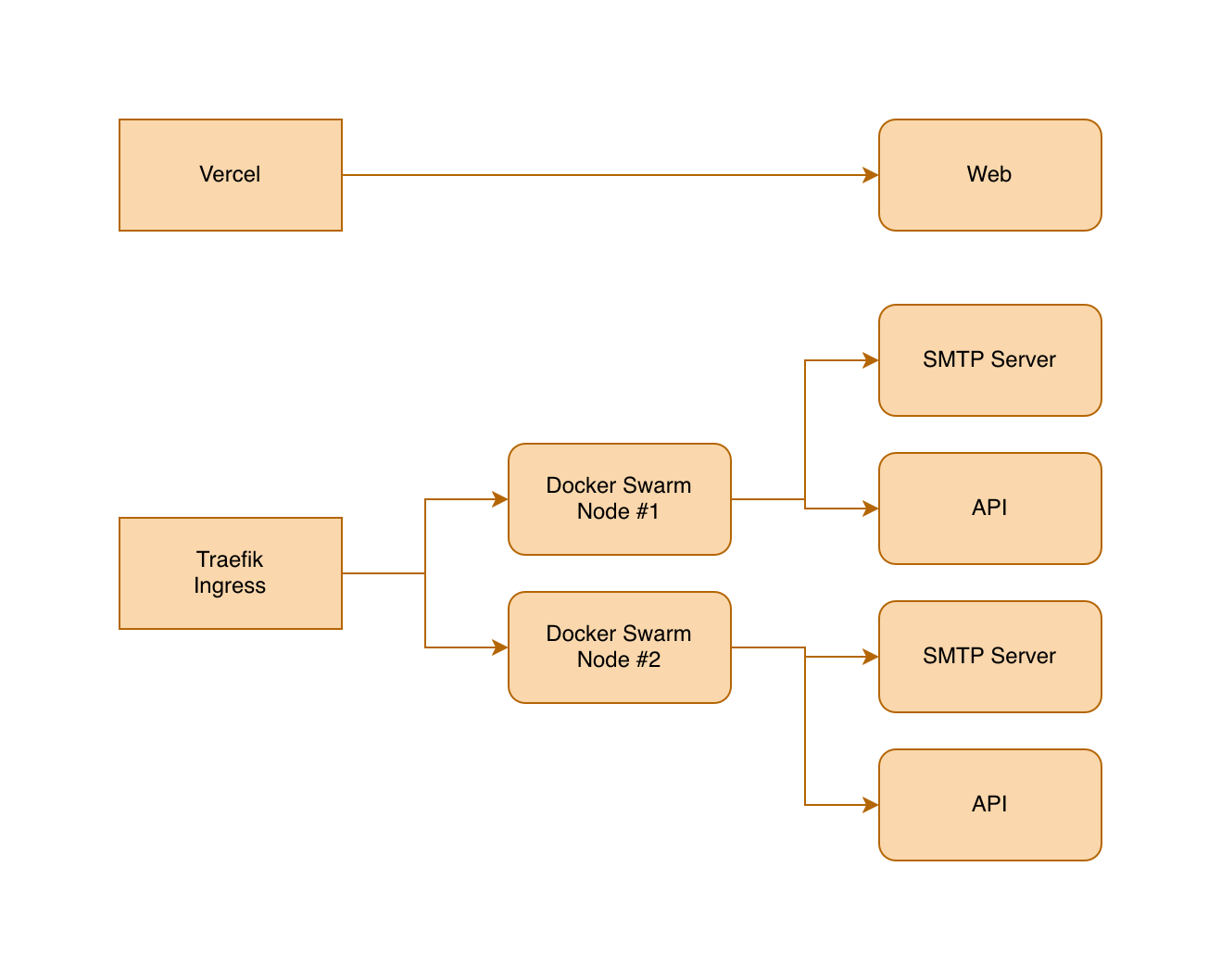
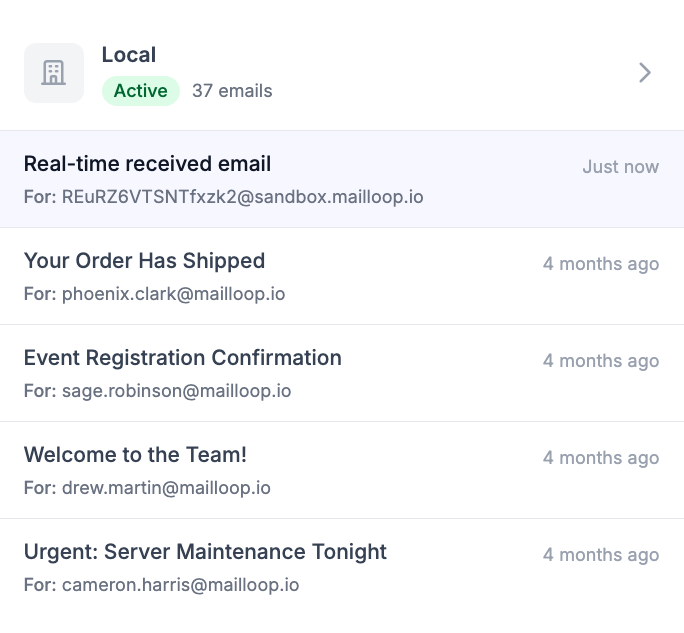
Left: The three-service monorepo architecture (frontend, SMTP + WebSocket server, and API server run independently). Right: Real-time inbox view showing emails the moment they arrive.
Why not make this real-time?
All three services communicate through events. This architecture was primarily motivated by the real-time WebSocket feature, but it also made the SDK’s most useful function almost trivial to implement.
waitFor lets developers block until a specific email arrives. If you’re testing a password reset flow, you trigger the reset, then call waitFor({ to: "user@test.mailloop.dev" }) and it resolves when the email shows up. No polling loops, no arbitrary delays, no flaky CI. The event system means there’s no polling on the server side either. The email arrives, an event fires, the waiting SDK client gets notified.
// Send email via SMTP to sandbox
await transporter.sendMail({
  from: 'welcome@yourservice.com',
  to: sandbox.emailAddress,
  subject: `Welcome email`,
  text: `Welcome to our service, ...`,
});

// Wait for email using SDK (or throw when not received)
const email = await client.emails.waitFor(sandboxId, { subject, timeout: 5_000 });
Scaling SMTP behind a load balancer
This was the most time-consuming infrastructure work. The stack is Docker Swarm with Traefik.
Problem 1: Non-HTTP TCP routing. Nearly all Traefik documentation covers HTTP on ports 80/443. SMTP needs ports 25, 465, 587, and 2525. Configuring TCP entrypoints and routers for these ports required piecing together sparse docs and a fair amount of trial and error.
Problem 2: Client IP forwarding. Rate limiting needs the real sender IP. HTTP proxies use X-Forwarded-For. SMTP is raw TCP with no equivalent mechanism. The solution: Proxy Protocol v2. The load balancer prepends a binary header with the original client IP before forwarding the TCP connection to the backend. Both Traefik and the SMTP server need explicit configuration to handle this. The implementation was straightforward once I knew what to look for. The discovery process was not.
Payments and tax compliance
I started with Stripe, which is the standard choice for SaaS. The issue: Stripe makes you the merchant of record. As a solo developer in the Czech Republic, that means handling VAT compliance across every EU member state and potentially sales tax in US states. For a bootstrapped product, the accounting overhead is prohibitive.
I switched to Polar, a Merchant of Record service. They handle global tax obligations. I only deal with Czech tax requirements. The tradeoff is less control over the billing experience, but for a project at this stage, that’s a good trade.
And as my accountant is my really good friend, switching to Polar probably saved our friendship.
What I actually learned
Building this project was a really fun experience. It is ready to serve real customers without having to rely on expensive infrastructure like K8S and managed cloud. The next steps for me will be to try to move the needle on online marketing and business management.
The project is built to last. Time will tell how far-fetched the decisions were, but the infrastructure is set up to handle it (or atleast report ongoing problems).
If you’re building something that sends emails, give mailloop.io a try. There’s a generous free plan.